-
Import your Google Reader feeds into Feedreader Online
Just to let you know: Google Reader is closing.
I'm kidding. Of course you know it's shutting down. Many of us were utterly shocked to hear that Google Reader is due to close on July 1. The most popular tool to aggregate and browser RSS feeds has been discontinued, so the huge army of its users has started to look for a reliable alternative. Feedreader Online is just what you need.
One of their major requirements is that the new RSS viewer should allow for importing users' old feeds from Google Reader. That's understandable: some of them have been collecting RSS feeds for years, so it's no wonder they don't want their vast collection lost in a couple of seconds. Even less attractive is the prospect to transfer all the feeds manually, one by one. Don't think we missed this problem: Feedreader Online can give you a hand with this.
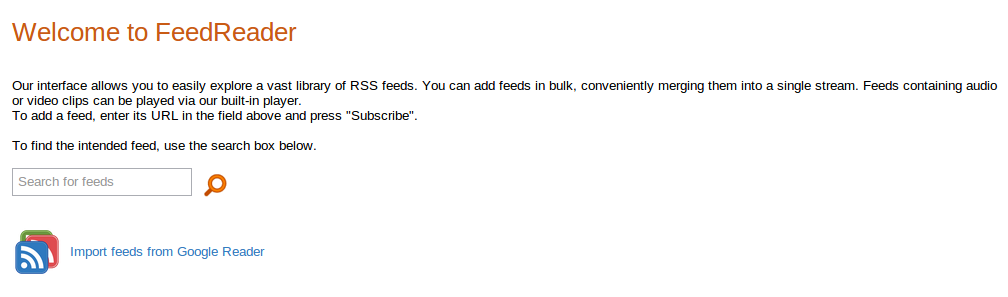
To import all of your Google Reader feeds into Feedreader Online, you just need to click 'Show stream info' in your Feedreader Online account. A large panel with the list of your feeds and a Google Reader logo button should open. The button with the Google Reader logo is obviously what you need. To illustrate this point, the text next to the right reads, 'Importing feeds from Google Reader'.
If you are not signed-in to your Google account, you are first prompted to log in, after which you are asked to Allow Feedreader Online access to your Google Reader feeds. If, by any chance, you are already logged-in, you'll get to see an access query without further ado.
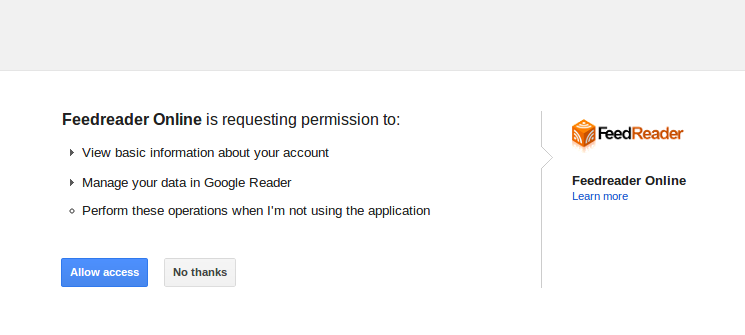
After you agree to give Feedreader Online this access, you may lean back and relax: that's basically it. Depending on the number of your feeds, importing them into Feedreader can take a while, so don't get afraid if page has been loading for too long. Eventually, you will be redirected back to your Feedreader Online account, where you can view all of your feeds in one stream. If you want to read separate streams, just open the Stream Info panel and click the feed's link. Voilà!
-
Introducing media player in Feedreader Online
Just to let you know: now Feedreader Online features a Flash-based media player, so you don't need to install any special software on your device to playback your podcasts and video feeds.
-
Introducing FeedReader Online
Just to let you know: we've launched FeedReader Online. It's available here.
-
Feedreader Connect for Linux available
Just to let you know - we released Feedreader Connect for Linux here
-
Introducing Feedreader Anywhere
Just to let you know. We are introducing Feedreader Anywhere on our new site.
What a great level of service from the feedreader developers, we had our Travel Insurance RSS up and running in less than 6 hours.
-
Feedreader 3.14 released
Just to let everybody (who does not follow our company news) know - we released Feedreader 3.14 yesterday :). More information from here.
-
Announcing something very specific - ultra-fast update intervals :)
We have gotten quite a lot of requests for faster update interval during these years. Be it then for tracking stocks news where actuality and speed of information is really important. Or be it tracking of embedded systems that output feeds with their status.
Till this time we have always replied that this is not possible because of architecture of Feedreader. But during last weeks we have studied the situation again a little bit based on the request of Danny :) and good news is that WE NOW HAVE SUPPORT FOR FASTER UPDATE INTERVALS.
Feedreader now supports update intervals as low as 10 seconds. And it works quite well. But there are some constraints to this functionality:
1) This functionality is officially unsupported. If it works then well, if somehow not, then there's nothing we can do.
2) Based on the fact that Feedreader can update up to four feeds at the same time (if you have enabled "use multiple connections") then this means that if you really want to update multiple feeds with update interval of 10 seconds then there is practical maximum of how much of them can be updated during one update cycle. For example if you subscribe to 4 feeds and let them to be updated after 10 seconds then in case of 8 feeds it's quite logical that update interval will be 20 seconds (because it takes two update cycles to update feeds). Of course you can play with "update priority" if some feeds must be updated after 10 seconds whatever it takes.
How this will work?
First you need to specify the update period override in feedreader.ini under [misc] section. It's written like this : boostupdatespeed=10. 10 means the new update interval period in seconds. Valid values are 10-59... If everything works then you will see "Fastupdate nn sec" in Feedreader form caption.
After this you should specify update period of "1 minute" in selected feeds. All feeds with update priority of "1 minute" will be updated with new update priority. All other feeds will be updated like they have been all these years :).
Availability
This functionality is available from Feedreader 3.14 beta 3. Just download it (if you have not yet done so) and try it out.
What's next?
If this feature is something that you have really been waiting for and you can make specific and resultant use of it then please comment on this thread (how you are using it, if it's not a secret ;)). We really appreciate it!
-
Feedreader 3.14 Beta 3 released
We are happy to release next beta release of Feedreader 3.14. It's following to the Beta2 what was released here.
Changes and additions that are changed since beta1:
Translation files now support latest User interface features
Some little (and old) bugs fixed
One cool and quite specific feature that we are not yet announcing :).
Edit: "Smartfeed not saved" bug is fixed!
Download
Please download beta from here (zip from here).
-
Feedreader 3.14 translations
Finally we have made available updated translation file that can be used for updating localized language files.
All translations who are interested in updating their translations can take feedreader.exe and translation_en.xml, save feedreader.exe over old 3.14 beta feedreader.exe and save translation_en.xml to localizations folder. After this you can edit your local language file by adding new strings from the end of translation_en.xml to localized translation file and translate strings that are between - tags.
If you find some items in Feedreader that are not translated then just let us know by adding comments in this thread.
-
Feedreader 3.14 Beta 2 released
We are happy to release next beta release of Feedreader 3.14. It's following to the Beta1 what was released here.
Changes and additions that are changed since beta1:
Offline support added
We have added basic offline support. It's good if you are going somewhere where you have a lot of time and no internet at all ;). A summer cottage, bus or plane is an example although at least in Estonia we have wifi even in intercity buses ;). You can also use this feature if you have slow internet connection because you can let Feedreader to preload all articles.
This feature turned out pretty cool. We did not want to over-engineer it and tried to keep it simple. Basically we save remote web pages (those webpages that are linked from articles title) to database. By default we do not save any images to make things run fast and smoothly. If you want to try out saving articles with images then add downloadwebpagestocache=1 to feedreader.ini. But I warn you that it may not be that smooth experience.
There are two ways of saving articles to database. One way is to select File > Offline > Work offline

After clicking on this link you will see new window that lets you automatically download articles that you need.

Just select the period from where you want to download articles, specify if you only want to download unread articles. "Leave feed updates running" means that you are activating offline mode for reading articles but at the same time everything else except the article retrieving from cache works normally. This is good maybe in case of slow connections where you would always wait for article web pages to download completely. Now you can let Feedreader download all articles to cache and then read them quickly.
If "Work offline" is activated then only difference between "online mode" is that if article is in our local cache and you click on article title in minibrowser then instead of going to remote web page Feedreader retrieves cached copy of this web page from database and shows like normal web page.
If you do not want to download all articles and are interested only in articles in some feed then you can click on "No download, just switch to offline mode" and select articles that you want to download. After this select "Download selected articles for offline viewing" from article listing popupmenu.

In previous screenshot you also see how the articles that are in cache are displayed. Basically a little blue marking in front of article title.
Other changes:
Download
Please download beta from here (zip from here).
 Haberler

